Blank Comic Book KDP Interior Ready File Guide
Creating a low-content book for Amazon KDP often feels like a race against technical specifications. Margins shift, bleed settings fail, and resolution drops at the last minute. A professional Blank Comic Book KDP Interior Ready File eliminates this friction entirely. Instead of spending hours configuring document sizes and panel grids in design software, you receive a pre-validated foundation. This resource is not just a template; it is a production asset designed to bridge the gap between a creative concept and a published product.
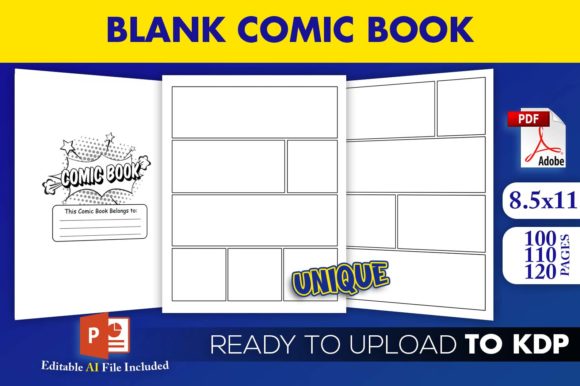
The value lies in the technical assurance. These files have been tested on KDP, meaning the trim size of 8.5×11 inches adheres strictly to platform guidelines. When you download this package, you are securing peace of mind alongside creative potential. The inclusion of three distinct PDF interiors (100, 110, and 120 pages) allows you to match page count to price point and niche requirements without reformatting. For creators, educators, and entrepreneurs, this transforms comic book creation from a technical hurdle into a streamlined workflow.
What Makes This Interior File Unique
Most generic templates offer a single static layout. This Blank Comic Book KDP Interior Ready File provides versatility through variety. The package includes high-resolution interiors that maintain crisp lines even when printed on standard color or black-and-white paper. Blurriness is a common complaint in self-published comics, often resulting from upscaling low-quality images. These files are generated at print-ready resolution, ensuring professional quality straight out of the box.
The editable PowerPoint source file (.pptx) is a significant differentiator. While PDFs are excellent for final upload, they are rigid. The PPTX file grants you agency over the design. You can adjust panel spacing, add title pages, insert copyright notices, or modify margins if your specific project demands deviation from the standard. This hybrid approach—ready-to-upload PDFs for speed and an editable source file for customization—caters to both beginners launching their first book and experienced publishers refining a brand identity.
Creative Applications Beyond Traditional Comics
While the primary function is storytelling, blank comic panels serve as versatile containers for various types of content. Restricting this tool to superhero narratives limits its ROI. Consider how different audiences utilize visual frameworks:
- Educational Storyboarding: Teachers and tutors can use these books for visual literacy exercises. Students who struggle with traditional essays often excel when asked to sequence events visually. The 8.5×11 trim size provides ample space for detailed illustrations and text bubbles, making it ideal for classroom activities or homeschooling curricula.
- Therapeutic Journaling: Art therapists and counselors frequently recommend visual journaling for processing emotions. Blank comic structures provide a safe container for expression. Unlike a blank white page, which can be intimidating, pre-drawn panels offer a starting point. Users can fill in feelings, dialogue, or abstract representations of mental states without needing advanced drawing skills.
- Business Process Mapping: Entrepreneurs and marketers can repurpose comic layouts for customer journey mapping or product storyboards. Visualizing a user experience flow in comic format makes complex processes accessible to stakeholders. This application works particularly well for internal workshops or as a unique lead magnet for creative agencies.
- Language Learning: ESL educators use sequential art to teach vocabulary and grammar in context. A blank comic book allows students to create their own dialogues, reinforcing language acquisition through active creation rather than passive consumption.
Adapting Page Counts for Market Strategy
The inclusion of 100, 110, and 120-page variations is strategic. In the KDP ecosystem, page count directly influences printing costs, royalty rates, and perceived value. Understanding when to use each variation is crucial for profitability and audience satisfaction.
The 100-page version is optimal for lower price points or promotional items. It serves as an excellent entry-level product for new authors testing a niche. If you are creating a giveaway for a blog, a sampler for a larger series, or a budget-friendly activity book for kids, this length keeps production costs minimal while maintaining a substantial feel.
The 110-page option strikes a balance. It offers enough content for a standalone graphic novel or a comprehensive workbook without pushing the spine width into higher pricing tiers unnecessarily. This is often the sweet spot for hobbyists and indie creators who want a professional thickness that feels satisfying in hand but remains competitively priced.
The 120-page interior targets premium positioning. Thicker books signal value to buyers browsing thumbnails. This length is appropriate for anthologies, detailed educational resources, or journals intended for long-term use. If your target audience expects depth and durability, the additional pages justify a higher retail price and improve the physical presence of the book on a shelf.
Customizing the Editable Source File
To maximize the utility of the PowerPoint source file, approach it with a clear plan before editing. Random adjustments can compromise the print-ready status. Start by defining your project’s unique needs. Do you require a dedication page? A character profile section? An index? Use the master slide feature in PowerPoint to apply global changes across all pages efficiently. This ensures consistency in fonts, line weights, and margins.
When modifying panel layouts, always respect the safe zone. Even though the files are pre-tested, moving elements too close to the gutter or outer edge during customization can trigger KDP errors. Keep critical content at least 0.375 inches from the trim edge. If you add custom graphics or text overlays, ensure they are embedded or flattened properly before exporting to PDF. High-resolution exports are non-negotiable; set your export settings to preserve image quality rather than optimizing for screen viewing.
Consider branding opportunities within the editable file. Adding a subtle logo to the bottom corner of each page or creating a custom title page template builds recognition. For series creators, consistent interior formatting establishes a cohesive reader experience. The PPTX file allows you to save these branded modifications as a new master template, accelerating future production cycles.
Ensuring Quality and Consistency
Technical compliance is only half the battle; aesthetic coherence determines whether a book receives positive reviews. When using a Blank Comic Book KDP Interior Ready File, maintain visual rhythm. If you alter panel sizes, do so intentionally to support pacing, not arbitrarily. Sudden shifts in grid structure can disorient readers unless they serve a narrative purpose.
For non-fiction or educational applications, clarity trumps stylistic experimentation. Ensure adequate white space around text areas. Dense panels with heavy borders can make instructional content feel cluttered. Test print a few pages on your home printer before finalizing. Screen brightness often masks issues that become apparent on paper, such as lines that are too faint or contrast ratios that are too low.
Originality matters even when using pre-made interiors. The framework is standardized, but the content must be yours. Add unique value through introductions, prompts, guides, or supplementary material. A blank comic book becomes a distinctive product when paired with thoughtful front and back matter. Use the editable file to craft an engaging introduction that explains how to use the book, suggests prompt ideas, or shares the creator’s inspiration. This contextual layer transforms a generic utility item into a curated creative experience.
Practical Workflow Recommendations
Integrate this asset into a sustainable publishing routine. Begin by selecting the appropriate page count based on your market research. Download and immediately verify the PDF files against current KDP specifications using their previewer tool, even though they are pre-tested. Platform requirements occasionally update, and verification takes only minutes.
If customizing via PowerPoint, work on a copy of the original file. Never overwrite your master source. Organize your project folder clearly: keep raw assets, edited versions, and final export PDFs in separate directories. This organization prevents version confusion and protects your base template for future projects.
Finally, consider the cover in relation to the interior. Since the interior uses a standard 8.5×11 trim size, your cover dimensions are fixed. Design the cover to reflect the interior’s style. If the panels are clean and minimalist, avoid a chaotic cover. Visual alignment between exterior and interior signals professionalism to potential buyers. The Blank Comic Book KDP Interior Ready File handles the structural heavy lifting, freeing you to focus on the creative and marketing elements that truly differentiate your publication in a crowded marketplace.