Key Control Log KDP Interior: Practical Design Guide
Creating a functional low-content book requires more than just drawing lines on a page. For security professionals, property managers, and office administrators, organization is not a luxury; it is a liability requirement. A well-designed Key Control Log KDP Interior serves as a tangible audit trail, bridging the gap between digital tracking and physical accountability. When you approach this specific niche, you are solving a genuine operational problem rather than simply filling space on Amazon. The value lies in the utility of the layout and how intuitively a user can record critical data during a busy shift.
The most effective interiors prioritize clarity over decoration. In high-stress environments like hotels, hospitals, or construction sites, staff members need to log key issuance in seconds. Your design must facilitate speed without sacrificing accuracy. This means establishing a clear visual hierarchy where column headers are distinct, writing space is adequate, and the flow of information follows a logical left-to-right progression. By focusing on these ergonomic details, your Key Control Log KDP Interior becomes a tool that users trust and repurchase, distinguishing your brand from generic competitors.
Essential Data Fields for Security Compliance
Before opening your design software, you must understand what information actually matters to your end user. A common mistake in low-content publishing is including irrelevant fields that clutter the page or omitting critical data points that render the log useless for auditing. Researching industry standards ensures your interior meets professional expectations.
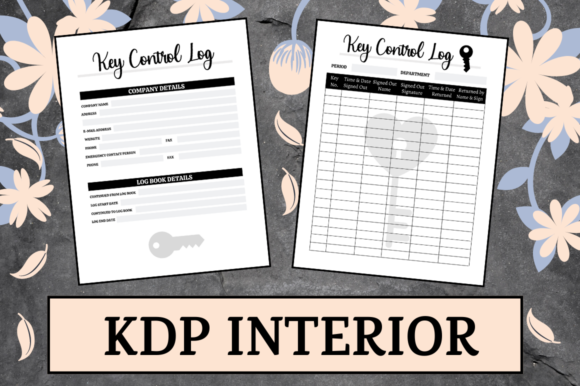
- Date and Time: Separate columns for date and time prevent ambiguity. Use a 24-hour format indicator or ample space for AM/PM notation to avoid confusion during shift changes.
- Key Identifier: Provide sufficient width for key codes, tag numbers, or fob IDs. Generic "Key Name" labels are often too vague for large facilities.
- Issued To and Authorized By: Accountability requires two signatures. Ensure signature lines are long enough for legible handwriting, which is crucial for legal verification.
- Purpose or Reason: A dedicated column for notes allows staff to document maintenance requests, emergency access, or contractor visits, adding context to the transaction.
- Return Verification: Include a checkbox or initial box for confirming the key was returned. This simple visual cue helps prevent lost inventory.
Incorporating these elements transforms a basic notebook into a compliant security document. When users see that you understand their workflow, they perceive higher value in your product.
Leveraging Three PDF Variants for Market Reach
Offering three different variants of PDF files within a single listing or series significantly increases your potential audience. Different organizations have different documentation standards, and a one-size-fits-all approach often leads to returns or negative reviews. By diversifying your interiors, you capture multiple segments of the market simultaneously.
Variant A: The Standard Daily Tracker
This version focuses on high-volume logging with a landscape-oriented table structure. It maximizes horizontal space for detailed entries and is ideal for front desks or security booths where multiple keys change hands hourly. The layout should be dense but readable, utilizing alternating row shading to guide the eye across the page and reduce transcription errors.
Variant B: The Individual Custody Sheet
Some facilities prefer tracking by person rather than by chronological event. This variant dedicates an entire page to a single employee or contractor, listing all keys assigned to them over a week or month. This format is excellent for maintenance teams or cleaning crews who carry the same set of keys daily. It reduces repetitive writing and provides a quick snapshot of individual responsibility.
Variant C: The Incident and Audit Report
Beyond daily tracking, many businesses require incident reporting. This variant combines a standard log with expanded note sections for documenting lost keys, broken locks, or unauthorized access attempts. Including space for supervisor comments and corrective actions makes this version indispensable for quarterly audits and insurance reviews.
Technical Specifications for Flawless Printing
A beautiful design fails if it prints poorly. Adhering strictly to technical requirements ensures your Key Control Log KDP Interior looks professional upon arrival. For this specific project, the trim size is set to 8.5 x 11 inches with no bleed. This constraint actually benefits functional logs, as it guarantees a consistent margin that prevents text from being trimmed off or bound too tightly.
Maintain a safe zone of at least 0.375 inches on the top, bottom, and outside edges. More importantly, account for the gutter margin on the inside edge. With 120 pages, the binding will consume space. Set your inside margin to at least 0.75 inches to ensure users can write comfortably near the spine without straining their wrists or obscuring data. Test your PDF files at 100% zoom before uploading to verify line weights; lines thinner than 0.5pt may appear broken or faint in print, while overly thick lines can look clunky and unprofessional.
Adapting Designs for Specific Niches
Versatility is key to sustaining a low-content business. While the core mechanics of key control remain similar, the aesthetic and terminological nuances vary by industry. Adapting your interior to specific contexts can improve conversion rates and customer satisfaction.
For Hospitality: Focus on guest privacy and room numbers. Use softer fonts and include fields for "Guest Name" or "Room Number" alongside key tags. The tone should be welcoming yet secure.
For Construction: Durability and clarity take precedence. Use bold, sans-serif typography and high-contrast lines. Include fields for "Site Location," "Contractor Company," and "Equipment Locker." These users often write in dusty conditions, so generous spacing is essential.
For Education: Schools track classroom keys, AV equipment, and master fobs. Add columns for "Department" or "Building Wing." Consider including a small reference section on the first few pages for school-specific key policies or emergency contact numbers.
By tailoring the language and layout to these sub-niches, you move beyond generic competition. You demonstrate expertise and provide a solution that feels custom-made for the buyer’s specific environment.
Ensuring Long-Term Usability and Value
The goal of a 120-page logbook is to last through months of daily use. Design decisions should support longevity and ease of reference. Consider adding index tabs or monthly divider pages if your variant structure allows. Even without bleed, you can create visual separation using grayscale blocks or typographic breaks that help users navigate the book quickly.
Consistency is equally important. Ensure that header placement, font sizes, and line weights remain identical across all 120 pages. Sudden shifts in alignment disrupt the user experience and suggest poor quality control. Before finalizing your Key Control Log KDP Interior, print a test copy at home or order a proof. Physically writing in the log reveals issues that screens cannot show, such as paper texture compatibility or cramped handwriting space. This practical validation step is what separates successful publishers from amateurs.
Ultimately, your success in this niche depends on empathy for the end user. They are not buying a book; they are buying peace of mind and organizational efficiency. When your design respects their time and supports their compliance needs, you build a sustainable asset for your publishing portfolio. Keep iterating based on feedback, stay updated on security best practices, and continue refining your layouts to serve this essential professional function.