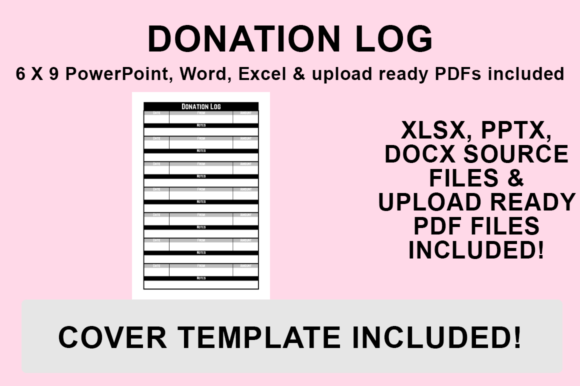
KDP Interior - Donation Log: Customizable 6x9 Template
Creating a successful low-content book on Amazon KDP often comes down to the quality and usability of the interior. For non-profits, religious organizations, community groups, and fundraising committees, tracking contributions is not just about accounting; it is about stewardship and transparency. The KDP Interior - Donation Log template addresses this specific need by providing a professional, print-ready foundation that saves creators hours of design work. Rather than struggling with margins and bleed settings from scratch, publishers can utilize these pre-formatted files to launch a high-quality logbook that serves a genuine purpose for end-users.
This resource is more than a static PDF; it is a comprehensive design kit. By including source files in PowerPoint, Word, and Excel alongside a print-ready PDF, the template empowers you to tailor every aspect of the book. Whether you are publishing under your own imprint or creating internal resources for an organization, having editable source files ensures the final product aligns perfectly with specific branding guidelines or functional requirements. The 6″x9″ trim size is the industry standard for portable logbooks, offering enough writing space for entries while remaining compact enough to fit in a bag or desk drawer.
Versatility Across Editing Platforms
One of the most significant advantages of this KDP Interior - Donation Log package is platform flexibility. Not every creator owns Adobe InDesign or possesses advanced graphic design skills. By providing source files in ubiquitous software like Microsoft Office, the barrier to entry is drastically lowered. Each format serves a distinct workflow preference:
- Microsoft Excel: Ideal for users who view the donation log primarily as a data collection tool. Excel allows you to adjust column widths precisely, modify table headers, and ensure alignment is mathematically perfect before exporting. If your log requires complex tracking fields like tax receipt numbers, donor categories, or restricted fund codes, Excel offers the grid-based control necessary to structure these elements cleanly.
- Microsoft Word: Best suited for text-heavy layouts or traditional formatting. Word is excellent if you plan to add introductory pages, mission statements, or thank-you letters within the logbook. Its familiar interface makes changing fonts, adjusting line spacing, and inserting page breaks intuitive for writers and administrators who may not be designers.
- PowerPoint: Surprisingly powerful for layout design. Because PowerPoint treats each page as a canvas, it allows for free-form placement of graphics, watermarks, and decorative elements without fighting against rigid document flow. This is often the preferred choice for creators who want to add visual flair or custom branding elements to their KDP Interior - Donation Log without learning vector software.
Regardless of which application you choose, the files are pre-configured with NO BLEED settings sized specifically for 6″x9″ printing. This eliminates the most common technical error in KDP publishing: incorrect margin safety zones. You can focus entirely on content and aesthetics rather than troubleshooting print rejection notifications.
Strategic Customization for Market Differentiation
The low-content book market is competitive, and generic interiors rarely stand out. The ability to edit the KDP Interior - Donation Log is your primary lever for differentiation. When you open the source files, consider how specific niches require different data points. A church tithing envelope tracker needs different columns than a university alumni fundraising log or a GoFundMe campaign record keeper.
Use the editing capabilities to create niche-specific variations. You might add a "Payment Method" column for digital-first fundraisers, or include a "Follow-Up Required" checkbox for relationship-based development teams. Changing the typography to match a specific aesthetic—such as using serif fonts for heritage organizations or clean sans-serifs for modern tech non-profits—instantly signals to the buyer that this book was designed with their specific context in mind. Adding subtle graphics, such as organizational logos, thematic borders, or inspirational quotes in the footer, transforms a utilitarian spreadsheet into a branded experience. These small customizations increase perceived value and justify a higher price point compared to unbranded alternatives.
Practical Applications and User Benefits
Understanding who will actually use the finished book helps inform how you customize and market it. The KDP Interior - Donation Log serves diverse environments where financial accountability intersects with physical record-keeping:
- Faith-Based Organizations: For churches, synagogues, and mosques that still receive cash or check donations during services. A printed log provides a tangible chain of custody that digital tools sometimes lack, reassuring congregants about financial integrity.
- Schools and PTAs: Parent-teacher associations and school clubs often manage cash from bake sales, car washes, and ticket events. Volunteers rotate frequently, so a standardized, easy-to-use logbook ensures continuity and reduces errors during handoffs.
- Small Non-Profits: Organizations without expensive CRM software often rely on paper backups. This log serves as both a primary recording tool and a disaster recovery backup for digital databases.
- Political Campaigns: Compliance is critical in fundraising. A structured log helps campaign treasurers track donor information required for regulatory reporting, ensuring no contribution falls through the cracks during busy election cycles.
For the end-user, the benefit is cognitive offloading. Instead of remembering to record details later or scribbling notes on scrap paper, they have a dedicated, structured space that prompts accurate data entry. This improves efficiency, reduces reconciliation time at month-end, and creates a professional impression when auditors or board members review records.
Exporting Your Customized File for KDP Upload
Once you have tailored the KDP Interior - Donation Log to your specifications, proper export procedures are essential to maintain print quality. Even though the file is pre-sized, the conversion process can introduce artifacts if handled incorrectly. Follow this precise workflow to ensure your customized interior meets Amazon’s technical standards:
- Final Review: Open your desired file (PowerPoint, Word, or Excel) and make all necessary changes. Double-check font embedding permissions, verify that all graphics are high resolution (300 DPI minimum), and confirm that no text sits closer than 0.375 inches to the gutter margin.
- Initiate Export: Go to ‘File’ and select ‘Save As’. Avoid using "Print to PDF" drivers when possible, as native export functions typically preserve metadata and hyperlinks more reliably.
- Select Destination: Choose where you want to save your PDF file. Create a dedicated project folder to keep your source files and final PDF organized together for future updates.
- Format Selection: From the ‘Save as type’ dropdown, select – PDF (.pdf). Ensure any available options are set to "Standard" or "High Quality Print" rather than "Minimum Size," which compresses images below acceptable thresholds for physical books.
- Complete Save: Click Save. Before uploading to KDP, always open the resulting PDF to visually inspect the first few pages and last few pages. Verify that margins appear correct and that no elements shifted during conversion. The file is then ready for upload to KDP.
Making Informed Design Decisions
When evaluating whether to use this template versus designing from scratch, consider the opportunity cost. Designing a compliant 6x9 interior with proper margins, consistent headers, and functional table structures can take dozens of hours for someone unfamiliar with print specifications. This KDP Interior - Donation Log package compresses that timeline significantly, allowing you to allocate energy toward keyword research, cover design, and marketing strategy instead.
However, avoid the temptation to leave the template completely unmodified. Books with identical interiors to dozens of competitors struggle to gain traction. Use the included source files as a starting point, not a finish line. Test different layouts, experiment with adding instructional pages, and consider bundling the donation log with related resources like expense trackers or volunteer sign-up sheets. The combination of technical readiness and creative flexibility makes this template a practical asset for serious KDP publishers looking to serve the organizational and non-profit niche effectively.